
Offer something valuable in exchange for contact details. This could be a free resource or a free trial. Keep your lead magnet simple and focused on one clear benefit.
What a Lead Magnet Includes
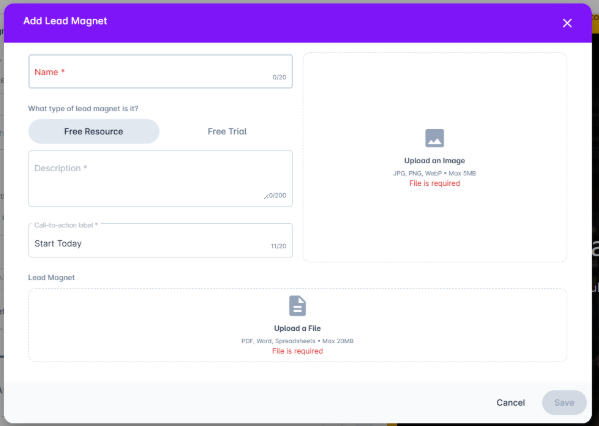
Basic Details
Background image (required)
Name (required)
Type
Choose one of the following:
Free Resource
Upload a file for users to download:
PDF
Word document
Spreadsheet
Max file size: 20MB
Free Trial
Give users temporary access to your service.
Description
Explain what users will get and why it’s valuable.
Call-to-Action Label
This is the button text users will click (for example: Download Now or Start Free Trial).
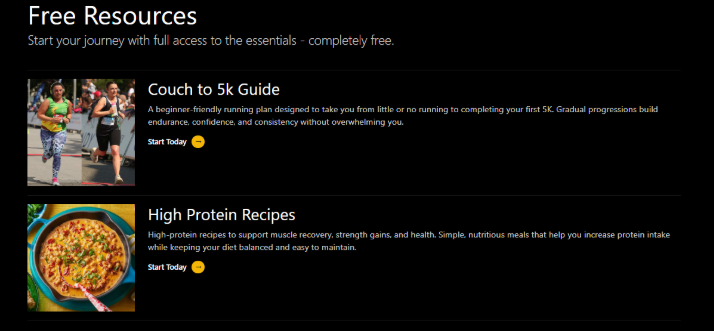
This is how a completed section appears:
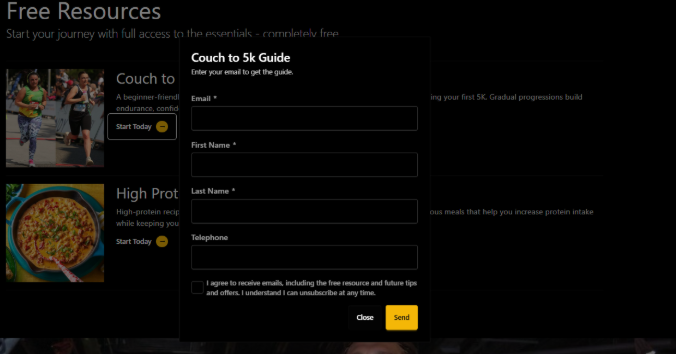
When someone clicks on your lead magnet, they’ll be asked to complete a contact form. Once submitted, your resource is automatically sent to their email.
All submissions will appear in your Prospects board for you to follow up.
You can customise your lead magnet email by going to Account → Settings → Email Configuration and editing it there. See the full guide below:
Can I edit the lead magnet email?
Learn how to customise the lead magnet email to suit your brand