Use this section to offer your services for purchase. Clients can check out directly here and will be automatically added as active clients.
What a Service Includes
Each service is made up of the following:
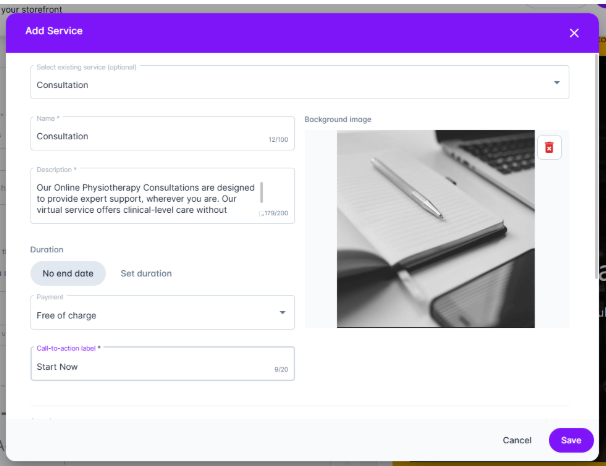
Basic Details
Background image (required)
Name (required)
Description (required)
Duration
Choose how long the service lasts:
No end date
Fixed duration (days, weeks, or months)
Pricing
Set how clients will pay:
Free of charge
One-off payment
Recurring (daily, weekly, or monthly)
If you set a price, this will be displayed on the service tile in your storefront
Call-to-Action Label
This is the text on the button users click (for example: Buy Now or Get Started).
Attachments (Optional)
Include any helpful files or resources.
Available Content
Training Plan (select one)
Forms (select one or more)
Add a service
Click Add Service
Choose one of the following:
Select an existing service (this will auto-fill the details)
Create a new service (you’ll need to complete all fields)
When a visitor selects your service, they’ll be taken to the checkout page. Once the purchase is complete, they’ll be automatically added to your client list and assigned any training plans and/or forms included in the service.
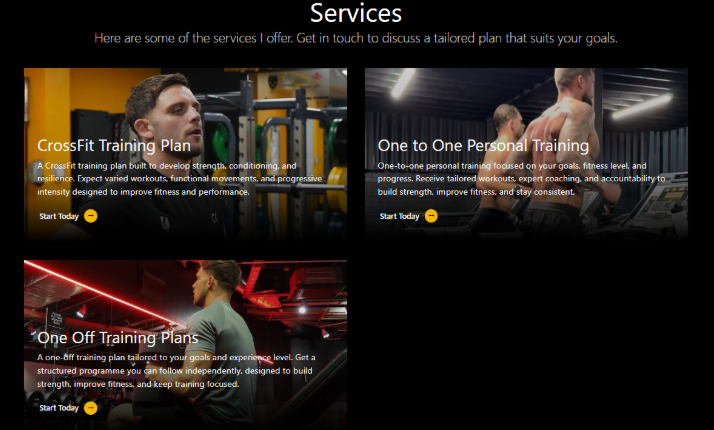
This is how the completed section appears: